HOME
DOWNLOAD
INSTALLATION
SAMPLES
REGISTER
BORDERMANIA
HELP
FAQS & FACTS
PHOTOSWIZZLE
Prism+ Help - Width
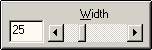
Width
Width controls how much of the image is covered by the facets. The range is from 0 to 100 where 0 is none of the image and 100 is all of it. The following example shows Width at two different settings.
Width = 15
Width = 30
Copyright © 1994-2013 Tom Carlino