|
Split selects how many slices the image is split up into. This
may be anywhere from 1 to 100. The sample area is actually half
the size of a slice and is wedge-shaped starting from the center
and moving out to the edge of the image like a slice of a pie.
The sample area is then mirrored to form each slice.
For example if Split is set to 4, the sample area is 1/2 of 1/4 or
1/8 of the image size. The sample area is mirrored to form a slice
1/4 of the image size and the slice is repeated 4 times in a
circular pattern to fill the entire image area as illustrated in
the following diagrams.
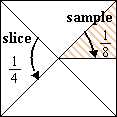
Sample Slice
|
|
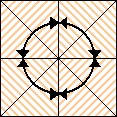
Slices Filled
|
|


