|
Offset works in conjunction with Range
to nudge the sample area that out from the center of the image
toward the edge. This allows you to zoom the sample area in on
a smaller part of the image when the range is less than 100%.
The amount that Offset moves the sample starting point is
a percentage of the distance that the reduced sample size
doesn't cover.
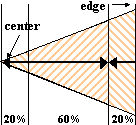
For example if the Range is set to 60, then the sample area is
restricted to 60% of the distance from center to edge of the
image. And if Offset is set to the default value of 0, the
sample area starts at the center of the image and ends 60% of
the way to the edge. The remaining 40% of the distance to the
edge is filled with the sample in reverse.
Suppose that Offset is set to 50 instead. That moves the sample
starting point away from the center of the image by 20% of
the distance from the center of the image to the edge. To get
the Offset distance we multiply the Offset (50%) by the distance
that the reduced sample doesn't cover (40%), so 50% x 40% = 20%.
The following diagrams illustrate how Range and Offset work
together for the settings discussed here.

Range= 60, Offset = 0
|
|
Range = 60, Offset = 50
|
| 


