

|
|

|
PHOTOSWIZZLE
Kaleidoscope Help - Mode
|
|
 |
Mode |
| |
|
Mode selects one of two ways that the sample area is painted
into the slices. For the default (mode 1) the first sample
fill for each slice is painted starting from the image center
and moving outward toward the edge. For mode 2 the painting
direction is reversed, starting from the outside edge of the
sample area and moving toward the center. Mode 2 also reverses
the painting direction for all repeat fills. See
Range for more information about
repeat fills. The following diagrams illustrate the difference
between mode 1 and mode 2 filling direction.

Mode = 1
|
|
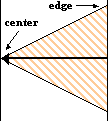
Mode = 2
|
|
|