|
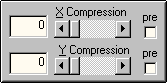
The compression controls squeeze the image toward the center either
horizontally (X Compression) or vertically (Y Compression).
The compression range is from 0 to 100 where 0 is no compression and
100 is maximum. The maximum compression is a little bit less than
100% of the nominal value because at 100% everything turns into a
straight line, at which point Fractals turns into a very high powered
and computer power intensive line drawing tool. So the maximum backs
off just a little bit from there.
With the compression controls Fractals faces a problem similar to that
for the position controls. The control calculations
have to be done in some order and there tends to be a conflict with
X-Y Rotation about which should go first.
This is where the pre check box helps out. The pre control
allows you to choose if compression is applied before X-Y Rotation
(pre selected) or at a stage after X-Y Rotation (pre
not selected).
When X-Y Rotation is non-zero, the compression controls without pre
selected tend to make the image look distorted but in the correct
direction. In contrast with pre selected there isn't any
distortion but it may look like the compression is in the wrong
direction as it does with the position controls.
Here are some examples of X Compression and X-Y Rotation combined.
The image on the left was created with the Fractals
default settings plus
X-Y Rotation 90. The other two images have some X compression and
show the difference when pre is selected.

X Compression = 0
|

X Compression = 30
pre not selected
|

X Compression = 30
pre selected
|
|