|
Symmetry is active only when Edge Align
is selected.
If Edge Align is not selected Symmetry does nothing.
When Edge Align is selected the frame is divided into four separate
sides (left, top, right and bottom) and Symmetry changes how the
texture is painted in the top and bottom relative to
each other and in the left and right sides relative to each other.
When Symmetry is not selected the top and bottom of the frame are
mirror images of each other and the left and right are mirror images
of each other.
When Symmetry is selected, the painting direction of the right side
and bottom are reversed. The painting directions are illustrated
below.

Symmetry not selected
|
|

Symmetry selected
|
Note that Skew should be set to 0 for
the opposite frame sides to be exact mirror images, otherwise
Skew will unbalance the mirror symmetry.
The following example shows the two symmetry selections for
a wood texture frame (Skew is 0).
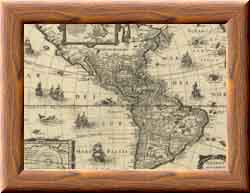
Symmetry not selected
|
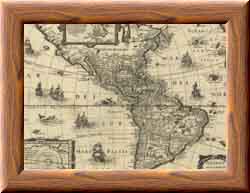
Symmetry selected
|
|