|
Skew causes the texture to be painted differently into each side
of the frame.
This is intended mainly for wood frames to help make each side
appear to be cut from a different piece of wood.
Skew is only active when
Edge Align is selected. It does
nothing when Edge Align is not selected.
When skew is set to 0 all of the frame sides (top, bottom, right, left)
are filled the same way, starting at the upper left corner of the
texture.
As the Skew setting increases (up to 100) each side of the frame is
filled from a different starting place in the texture. The Skew
setting is a percentage of the Texture size. For the left side
the percentage is the same as the setting value, for the right side
the is twice the setting value and for the bottom the percentage
is three times the setting value. So for the right side and bottom
the percentage can be more than 100%. When that happens it
wraps around back to the beginning of the texture.
For example, with Skew set to 25 the bottom starts filling
from 25% deep into the texture, the left side starts 50% deep into the
texture and the right side starts 75% deep into the texture.
The top always starts from the beginning of the texture no matter
what Skew is set to.
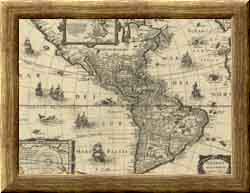
The following example shows Skew at two different settings. Note that
since Skew is set to 50 in the image to the right, the bottom skew
percentage is 50%, the left side is 100% and the right side is 150%.
So the left side percentage wraps back around to 0% and the bottom
wraps back around to 50%.

Skew = 0
|
Skew = 50
|
|